Archive for Android

23 Oct 2012

TimeGoal released on Saturday

No Comments Android, TimeGoal

On Saturday, we released our newest app on Android.  It’s called TimeGoal.  It is a home screen countdown widget which allows you to count down days to an event (70 Days to Christmas) or from an event (10 Days since my diet started). 

There are other “Days Left” widgets on the market, but this one has a few unique features:

1.  You can use your own images (from the camera or the gallery) as the background for your countdown.  So, if you have 5 days before you see a relative, you could use of photo of them to remind you.  You can rotate and crop the images you use.

2.  There are a few pre-made background images you could use.  These are festive (like Christmas Tree, a Jack-o’-lantern) and meaningful.  We will add more soon.

3.  You can add as many widgets to your desktop as you want.
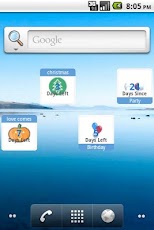
For the first release, we only have 1×1 widgets.  But the developers are working on some very cool new features with larger widgets.  There’s lot of room to scale this up and I have loads of ideas.  I couldn’t wait any longer and want to get this version out there.

TimeGoal in on the Google Play Store here.  It is free (add supported), but we will bring in either a pro version, or more functionality via in app purchases soon.

20 Oct 2012

Google Play Store and the 30 day bump

No Comments Android, Ear Spy

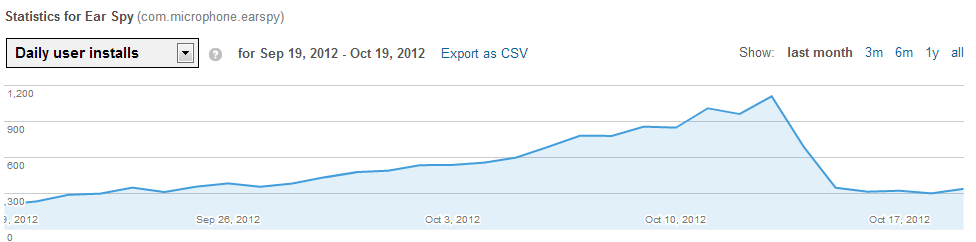
Ear Spy has been doing fantastically well.  Every day for the first month, the amount of daily installs was growing exponentially.  Eventually, we were getting over 1,000 installs a day for the free app.

Google Play has some really good statistics pages with charts and graphs about how well your app is doing, where it’s being downloaded, which types of phone are they using, etc.  But there is no way (that I can see) to tell how people are finding your app.  So, I couldn’t tell how they were finding it—but more and more people were downloading it every day.

After 30 days, the app was no longer considered “new” and dropped from the “Top New Free” apps list.  Then the daily downloads went from 1000+ to about 350 a day.

image

Still, I’m pleased with this number.  I couldn’t believe it when I found out 300 people a day were installing it almost a month ago.  But I kind of got used to the 1000 installs.

This is a learning experience.  So, the lesson I learned here is . . . make the most of the first 30 days!  Don’t be complacent.  Push the pro versions and try to convert as many free users to paying users in that first month.

Other interesting things from the stats:

1.  USA is the biggest downloader of the app (over 50% every day).  Egypt is always second and India is always third.

2.  There are a small amount of crashes compared to the amount of downloads (Google will give you a crash report).  But those few people who it crashes on are more likely to give you a one star rating.  I would too.

3.  Some phones have problems, but there are hundreds (if not thousands) to test.  So, we try to make it as flexible as possible and remove the phones we know are crashing.

4.  Some people will give you a one star rating even if the phone works most of the time.  One person says “It works on one phone, but not the other” and gave me a one star.  I would think I’d get at least a three.  But I would be annoyed too.

5 .  Only a tiny amount of people leave ratings.  Ear Spy has 76 ratings but has been installed by 17,656 people.

Well, we are implementing some very cool new features for Ear Spy Pro very soon.  We also released Ear Assist, which is a less-creepy version of Ear Spy to assist people who just want to hear better.

This iPhone version is days away.  It will be interesting to see how that compares.

Still having a blast with this.

27 Sep 2012

Ear Spy

No Comments Android, Ear Spy

For the past few months, so much has been going.  “I should write about this on the blog,” I constantly seem to be saying to myself.  But, my early (pre-contract) hours are full.  There is only so much you can do between 4:30 and 6:30.EarSpy

Probably the biggest new thing I’ve gotten into is App development. I’ve been very interested in it for a long time now, but finding the time to work on stuff has been difficult.  So, I hired some developers.

I had a strange idea for an Android app.  I sit is offices all the time—with headphones on if they don’t have a problem with it—and people are always murmuring to each other in gossipy ways.  If only, I thought, I could amplify my laptop mic straight into my headphones—maybe I could hear them better.  Sad, yes. 

So, I had an app idea to create a phone app that would allow you to look like you are listening to music, but you are listening to the world around you.  If you had an equalizer, maybe you could fine-tune it better.  Creepy?  Very.  But I would use it.  I sat on this idea for months—occasionally writing some code for it.

In a lunchtime conversation with some friends, I mentioned the idea.  My friend Matt, who runs a site called Budding Marketer, encouraged me on and came up with a cool name: “Ear Spy”.  I drew up a spec, designed a logo, and hired a very talented developer.2012-09-27 04.52.42

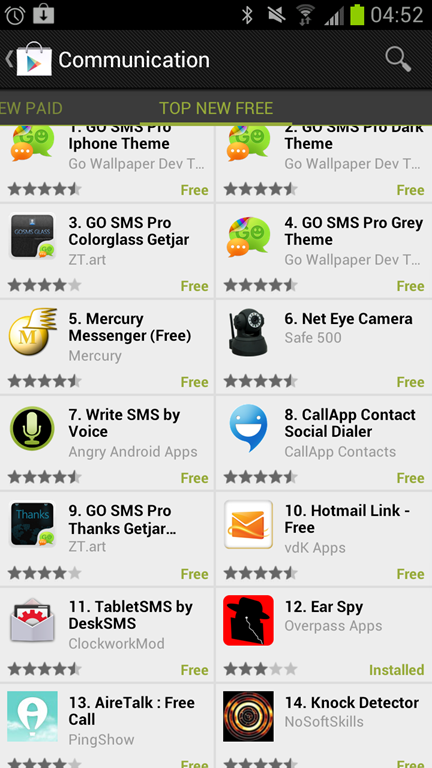
We released the app to the Google Market two weeks ago.  It has been installed 3,086 times so far.  It is currently ranked #12 in Top New Free apps in the Communication category.

We released two versions—a free version and a pro version.  The pro version is ad-free and gives you the ability to record to MP3.  Yesterday, released it with support for Chinese Mandarin and Hindi.

My goal is to experiment.  I change the price of pro and see how that reacts.  I write some stuff on Twitter, and see if that has an affect.  I watch the Google Market each day to see the numbers get updated.  An iPhone version is in development.  I will see how that performs and how different that is.

The biggest problem with Android has been the multiple devices.  It pains me to see that someone has had trouble with it or a crash on some device I never heard of.  I’m taking the one star ratings too personal too.  However, we’ve got quite a few 5 stars.

Anyway.  I’ve got 4 dedicated developers working on the next apps, so things are busy.  It’s very exciting, but very fun.  We should be up to 10,000 installs in a few weeks.  It is making money, but a very small amount.

Here is the link to the Ear Spy on the Google Play store: https://play.google.com/store/apps/details?id=com.microphone.earspy

27 Jun 2012

Android for the Visual Studio C# developer

No Comments Android, C# Coding, Software Dev & Productivity

Last year, I started looking into learning Android development.  I’m a C# developer who spends most of his time in Visual Studio, so I had some trouble getting accustomed to it.  I’ve looked at a lot of ways to ease the transition into Android.  Here are some of my thoughts:

Mono For Android or Proper Android Java

After struggling with Eclipse, I started looking into Mono for Android.  I’m a C# developer, and I have to say that I felt a lot more at home in Visual Studio. I’ve also done very little Java development over the years.  I took a week-long course in 1999—but mostly don’t use it.

I found Mono For Android to be decent, but it’s not easy.  You still have to have learn how to use intents and activities and use the xml layouts that are expected.  I found myself trying to learn the Android architecture and how the Mono libraries work with it.

Here are my problems with Mono for Android:

1.  There is far less documentation than you would need.  If you get in a bind, not many people would be able to help you.

2.  It’s like learning VB.Net instead of C#.  At some point, you have to take the hit and relearn a few things.  Almost all of the example code you look at will be in Java.

3.  I can’t be 100% that it will perform well enough on the device.  There could be a performance hit.  And you need to include the mono runtime, so it would bloat the size of your apk.

4.  It costs $400.  This is fine if I’m asked to create an app by the end of the week by an employer.  But when learning for fun, it’s too high a price to pay.  Besides, compared to “free”, it’s too expensive.

So, I prefer to native.

PhoneGap

I did a lot of stuff with PhoneGap too.  I love coding in javascript and there is so much that can be done with HTML5.  I was able to quickly code a little app that fed off data from Toodledo.  For cross platform, I think this is ideal.  But if I want to take full advantage of the Android platform, I would need to do native.

Eclipse or IntelliJ IDEA

So, I struggled with Eclipse.  Even things like autocomplete were throwing me because I was hitting TAB instead of ENTER to accept the autocomplete suggestions.  It was messing me up.  When I went back to Visual Studio, it was messing that up too.  I hate having my flow upset like that.

The majority of tutorials for Android development are using Eclipse.  All of the Android tools are well integrated into it.

However, JetBrains has a Java IDE called IntelliJ Idea which is soooo much better for a Visual Studio user than Eclipse is.  Jetbrains also develop Resharper, so their shortcuts are very similar.  There is a community edition (free) available here.  I highly recommend it for Visual Studio developers moving to Android.

The only downside I see with IntelliJ Idea is that some tools like DDMS viewer are not integrated into the IDE.  To use them, you have to go to the tools folder of your Android sdk folder and start them manually.  But everything is there.

Windows Phone 7

I did some WP7 work last year.  It’s a nice platform and I loved writing code for it.  But the market share is too small.  I know one person who has a Windows phone.  I upgraded my phone this weekend, I looked at the Lumia—but went with the Galaxy S3.  Maybe one day Microsoft will advance in the phone arena, but I have sincere doubts.